Herdr: a tmux for agents
When you have five agents and no terminal they fit in
A while back I wrote here about how I built parallel-work, a multi-agent orchestration plugin that splits a feature into parallel lanes: a coordinator hands out the work, several builders each build in their own worktree, a reviewer checks every PR, and QA plus an architect close out each wave. On paper it's textbook harness engineering. In practice, the moment you actually run it, you hit a question the design doesn't answer: where does that whole herd of agents live while it works?
Because that's exactly what you have once you go from "one agent in a tab" to five running in parallel across different worktrees: you stop having a conversation and start having a herd. One is compiling, another is blocked waiting for your approval, a third finished ten minutes ago and you haven't noticed, and a fourth has been doing something you didn't want for a while now. Desktop agent managers solve part of this with a pretty GUI, but they chain the herd to the machine the GUI runs on. And tmux, which does give you persistent sessions on any box over ssh, has no idea what an agent is: to tmux it's all just processes and bytes.
Herdr plants itself squarely in that gap — hence the name: herdr, as in herder; someone has to herd the herd — and that's why it caught my attention: it's the runtime layer that fits my orchestration flow. Its own tagline says it plainly: it is to coding agents what tmux is to terminals, an agent multiplexer. A coordinator handing out lanes needs exactly what Herdr provides out of the box —persistent panes that outlive your laptop, remote attach, and each agent's semantic status at a glance— so the herd can scale without a single one wandering off.
What Herdr is
Herdr is a single Rust binary —no Electron, no account, no telemetry— that runs where your agents run: a server, a Mac Mini, a sandbox VM, anything you can ssh into. It's open source under a dual license: AGPL-3.0 for everyone, with commercial licenses for organizations that can't comply with the AGPL. You reattach from any terminal, phone included. That's the first real difference from a desktop manager: the work lives on the machine where it makes sense for it to live, and the client is disposable. Close the laptop and nothing dies: go grab a coffee, reattach from another machine, and the herd is exactly where you left it.
On top of that persistent base, Herdr adds what neither tmux nor Zellij gives you: agent awareness. Every agent runs in its own real PTY —not a reconstructed chat view, the actual process— and Herdr shows you its semantic status at a glance: working, blocked, done, idle. That status doesn't depend on the agent reporting it: Herdr uses integration hooks when the agent ships them (Claude Code, Codex, and a long list) and, when it doesn't, infers the status by reading the pane's own screen — with deliberately strict blocked detection to avoid false alarms. That is exactly what you're missing when you have five running: knowing, without going tab by tab, which one needs something from you right now.
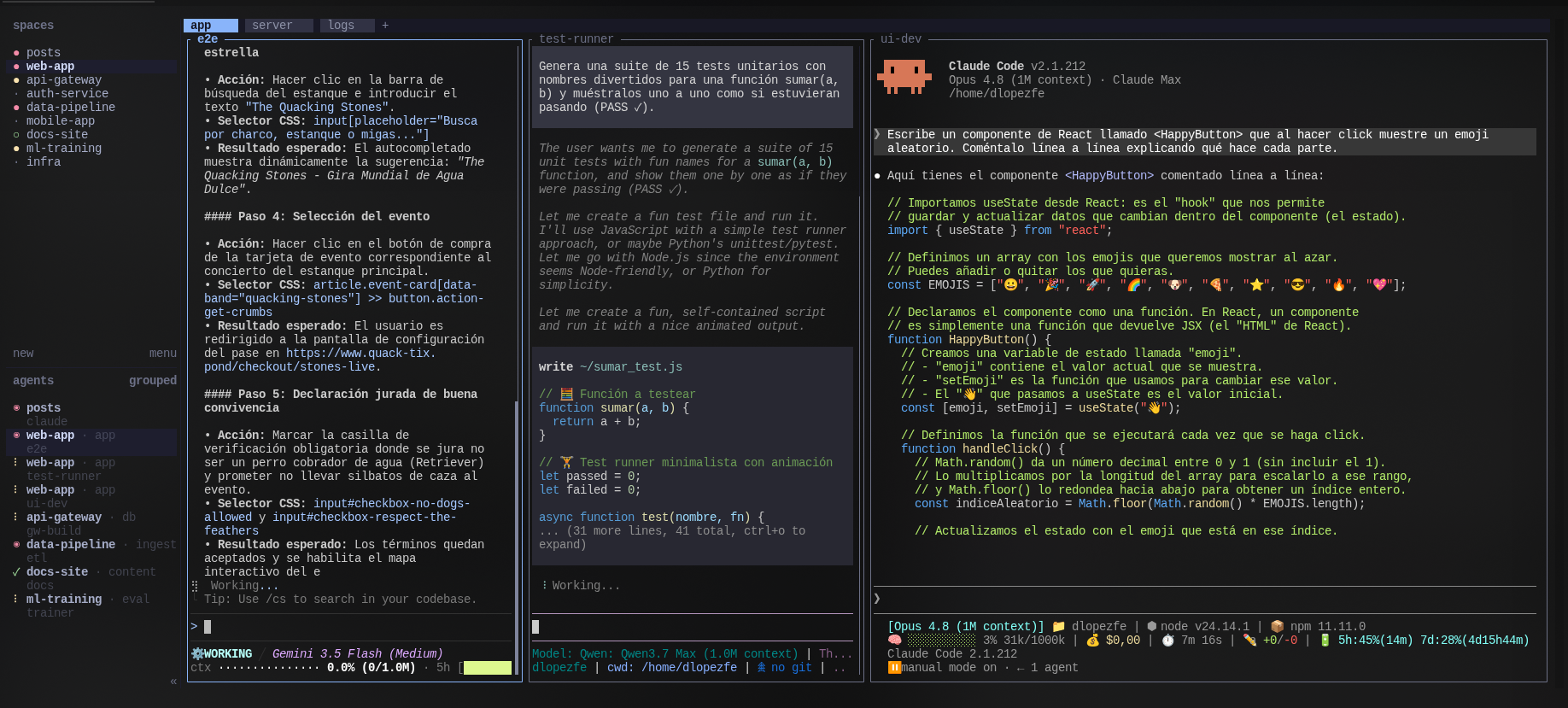
This is what the herd looks like grazing: three agents in adjacent panes —each on a different model—, the workspace tabs on top, and in the sidebar the workspaces and the agent list, grouped, with their status at a glance.
The differentiators that made me stay:
- It runs inside your terminal. It's not an emulator replacing Ghostty/Kitty/iTerm, nor a dashboard in the browser. It's a layer underneath, like tmux.
- Native remote attach.
herdr --remote workboxlooks for Herdr on the host and, if it's not there, offers to install it into~/.local/bin— zero manual provisioning, VS Code Server style. It also bridges your local clipboard (image paste included) and uses your local keybindings in the remote session. - Agents can orchestrate it too. There's a CLI and a JSON socket API, so an agent can create panes, launch commands, and wait for another one to finish. This is what makes it a piece of orchestration and not just a viewer.
The technical model: real panes and a control surface
The mental model comes straight from tmux and is inherited as-is: ctrl+b prefix, persistent panes, detach/reattach behaving as you'd expect. The difference in attitude is that Herdr is mouse-first: you can click panes, drag borders, and use context menus without learning a single shortcut. Shortcuts are an optional layer on top, not an entry toll.
What really opens the door to building things on top is the control surface: besides manual interaction, everything you see can be driven from the CLI or the socket. An example taken from its documentation:
# create the workspace structure
herdr workspace create --cwd ~/project --label api
herdr tab create --label logs

# split a pane and launch work
herdr pane split 1-1 --direction right
herdr pane run 1-2 "just test"

# wait, inspect, continue
herdr wait agent-status 1-1 --status done
herdr pane read 1-2 --source recent-unwrapped
That herdr wait agent-status ... --status done is the interesting primitive: it turns "keeping an eye on a tab" into something a script —or an orchestrator— can wait on programmatically.
The plugin ecosystem
This is where Herdr becomes extensible without stopping being lean. A plugin is not an SDK integration: it's a directory with a herdr-plugin.toml manifest and some commands Herdr can launch. It can be written in whatever your machine knows how to run —Bash, JavaScript, Lua, a Rust binary— because Herdr keeps the "host" side (installation, manifest validation, keybindings, panes, events, invocation context, socket access) and the plugin keeps its implementation.
The line from their docs that sums it up best: there is no separate SDK, the whole CLI is the plugin API. Whatever you can do with herdr ..., a plugin can do too, usually through HERDR_BIN_PATH.
The manifest declares actions, event hooks (for example worktree.created), managed panes, and link handlers. To show how little it takes, this is (trimmed) the real manifest of my own plugin, which I'll cover in the next post:
id = "tds.keymap"
name = "Keymap Palette"
description = "List herdr keybindings in an overlay and run the ones with a CLI equivalent"

[[panes]]
id = "palette"
placement = "overlay"
command = ["node", "src/keymap.ts"]  # Node ≥ 24 runs .ts natively

[[actions]]
id = "open_palette"
title = "Open keybindings palette"
command = ["bash", "open_palette.sh"]
And distribution is deliberately frictionless: the marketplace self-indexes from the herdr-plugin GitHub topic. No review queue, no form: add the topic to a public repo with its manifest and it shows up on the next refresh. There are over a hundred community plugins discovered that way today.
(No review also means you install at your own risk: a plugin is code running on your machine. Worth saying out loud.)
Where this fits
Herdr interests me for what it represents more than for what it does today: it moves agent orchestration from "an app watching one machine" to "a terminal primitive — persistent, remote, and drivable by API". That last point —that an agent can drive the multiplexer where the other agents live— is exactly the kind of surface real coordinators can be built on.
Side note: Claude Code itself just shipped something in this direction, the Agent view (claude agents, in research preview), and sinceparallel-workis a Claude Code plugin, I had to try it. It's well executed for what it is —it groups sessions by state, lets you peek without opening the full session, and moves edits into worktrees automatically—, but it's a very convenient local viewer, not a piece of orchestration: local only (sessions die when the machine shuts down, no remote attach), no rows of their own for the subagents a session spawns, and above all no CLI or socket a coordinator could drive. Herdr is an orchestration primitive precisely because it exposes that API. That said, it just came out: we'll see how it evolves.
And here the circle closes with parallel-work. When Herdr is present, the coordinator hosts each lane —its worktree, its session, its branch— in a tab of its own, and scaling from two agents to five stops being "where do I put all this?" and becomes one more tab. But the coordinator doesn't delegate judgment to the infrastructure: it polls the whole wave for state changes and confirms against the durable artifacts —the PR, the HANDOFF.md, the STATE.md—, never against the text on a tab. My plugin enforces the discipline (Design Lock, waves, verification gates); Herdr provides the substrate where that herd gets launched and stays observable. Persistence lives in the artifacts, not in the panes.
In fact, using it daily led me to write my own plugin for it: herdr-keymap, a shortcut palette that also runs the shortcuts. But that story —why it exists, how it's built, and the design decision I'm proudest of— I'll tell in another post.
Are you already using it to orchestrate your agents? I'd love to hear how you set up your herd.